
About
Chutzpah (hutz·pah) is an open source JavaScript unit test runner which helps you integrate JavaScript unit testing into your website. It enables you to run JavaScript unit tests from the command line and from inside of Visual Studio. It also supports running in the TeamCity continuous integration server.
Download
Download the executable and get the source code for the Chutzpah at its Codeplex page located at http://chutpah.codeplex.com.
You can also download Chutzpah using NuGet.
You can install the Chutzpah Visual Studio extension through the Visual Studio 2010/2012 extension manager or by going to its Visual Studio Gallery page and you can install the Chutzpah Unit Test Explorer adapter on this page.
What does Chutzpah do?
Chutzpah is both a Visual Studio extension and a command line utility.
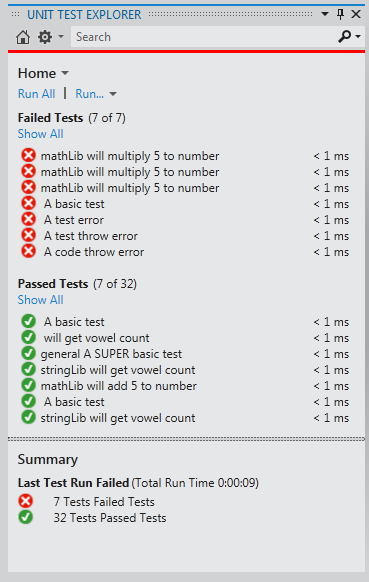
As a Visual Studio 2012 Unit Test Explorer adapter:
Visual Studio 2012 added an extensible test explorer which Chutzpah integrates into.
As a Visual Studio extension:
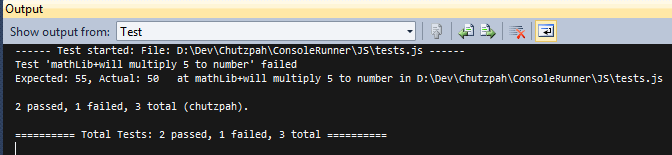
It allows you to run your JavaScript tests without leaving the IDE. It adds a context menu option to run tests directly from a source file.

It logs test results to both the Error list and the Output window.

As a command line utility:
It allows you to easily integrate test results into your build
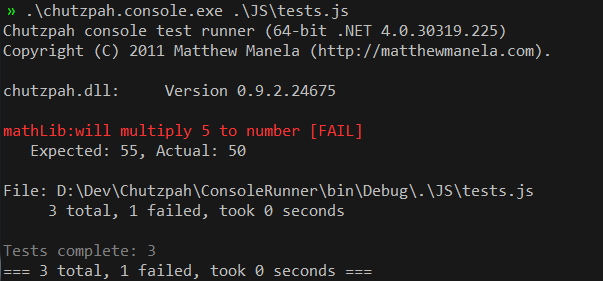
It also has support for the TeamCity continuous integration server so that you get detailed test output on every build.
How to use it?
Chutzpah is really easy to use, given QUnit tests (it only supports QUnit for now) you can run Chutzpah on the test harness HTML file and it will output the results. Chutzpah also supports running the tests directly from the JavaScript file as long as you add reference comments to the top of your test file.
For example given two files test.js (QUnit tests file) and code.js (implementation file).
code.js
var mathLib = {
    add5: function (a) {
        return a + 5;
    }
}
test.js
/// <reference path="code.js" />

test("will add 5 to number", function () {
    var res = mathLib.add5(10)

    equals(res, 15, "should add 5");
});
You can run the tests by right clicking and choosing “Run JS Test” if you are using the Visual Studio plugin, otherwise you can execute Chutzpah from the command line:
.\chutzpah.console.exe test.js
This is an excellent plugin.
Thank you very much!
Hi,
I follow this post http://blogs.msdn.com/b/visualstudioalm/archive/2012/07/09/javascript-unit-tests-on-team-foundation-service-with-chutzpah.aspx to configure Chutzpah on TFS server. However it only runs js files but not html files. I guess the reason is because the default testing mode is JavaScript. So, is there any setting or config file that I can set to enable both JavaScript and HTML files testing? I know as a VS extension I could set it from Tools menu but on TFS it is configured manually by copying the DLL files.
Yes, take a look at this documentation page on the Chutzpah codeplex site.
I’ve been trying to utilize your tool recently. A lot of great work, so thank you for that. I’m running into some issues though with qunit. When I run the html page in a browser, all my tests pass, but when I run them through the test explorer in Visual Studio 2012, 3 of the test fail. Is there some way I can post or send a test project so you can see it?
Thanks again for this wonderful utility!
File an issue on chutzpah.codeplex.com and attach a zip of your repro
Hi.
This is only a minor issue, but just wanted to ask if there is a solution to it.
Use case:
In VS2013 solution explorer I select a directory that contains typescript files (and also the compiled javascript files). Then from context menu i choose “Run JS Tests”. Chutzpah executes all Jasmin unit tests in .ts AND .js file, in fact executing each test twice.
Sample output from chutzpah:
—— Test started: File: C:\cpm\cpmPlus\History\Main\Vtrin\MiaReporting\MiaReporting\widgets\reporting\test\AggregatorTest.js ——
64 passed, 0 failed, 64 total (chutzpah).
—— Test started: File: C:\cpm\cpmPlus\History\Main\Vtrin\MiaReporting\MiaReporting\widgets\reporting\test\AggregatorTest.ts ——
64 passed, 0 failed, 64 total (chutzpah).
Is there a way to execute them only once (either from typescript or javascript files).
I have tried to configure chutzpah.json, but with no success:
{
“Framework”: “jasmine”,
“TestHarnessLocationMode”: “SettingsFileAdjacent”,
“TypeScriptCodeGenTarget” : “ES5”,
“References”: [
{ “Path”: “../../../client.js” },
],
“Tests”: [
{ “Path”: “.”, “Include”: “*.js”, “Exclude”: “*.ts” },
]
}
The same happens if you execute tests from command line tool chutzpah.console.exe
Anybody knows how to configure chutzpah, so that it only runs tests once (either on typescript or javascript test files)?
Please respond. Any help is appreciated.
The chutpah.json file should ignore those files. Could you please upload a repro (in a .zip file) as part of an issue on chutzpah.codeplex.com and I can take a look.
Matthew
Thanks for the work you put into Chutzpah. It makes a big difference in my day to day work.
Matthew
Is there anyway to easily update the version of qunit that chutzpah is using to run the tests?
No, it usually requires me to release a new version. I have thought about letting you point to your own but QUnit somtimes breaks compat with the apis I am using.If you really need the ability to specify your own version please file a bug on github.com/mmanela/chutzpah and I can look into it
Hi Matthew,
I am not able to see test results in test explorer as its not picking JS tests using jasmine, I can see the result in output window however. Please suggest.
Please file a issue on the github page with a full repro.
Is there still a version of (at least) the context menu runner that supports 2010?
I believe this one does: https://github.com/mmanela/chutzpah/releases/tag/v3.3.1
Hi
We are developing UWP app using angularJS and winJS for windows 10 using visual studio 2015. We are unable to test winRT apis using jasmine and chutzpah since chutzpah runs on a headless browser. How can we unit test our windows native features e.g. windows.storage.fileio etc.
Please post your question at https://github.com/mmanela/chutzpah
Does Chutzpah allow me to data drive tests using Visual Studio similar to the article below? Id like to use a data provider for input like sql. https://msdn.microsoft.com/en-us/library/ms182527(v=vs.80).aspx
why Chutzpah?
:)
Are you Jewish, Matthew?
:)